
Website performance is no longer just a technical metric—it directly impacts SEO rankings, user experience, and conversions. In this case study, we’ll walk you through how we optimized the performance of Asheville Vein Center’s website and significantly improved its Google PageSpeed Insights score.
In this blog I will cover everything: the before and after results, tools used, optimization strategies, and the exact steps we implemented to achieve these improvements.
Project Overview
Website: https://ashevilleveincenter.com/
Goal: Improve mobile PageSpeed Insights score, Core Web Vitals, and overall loading performance.
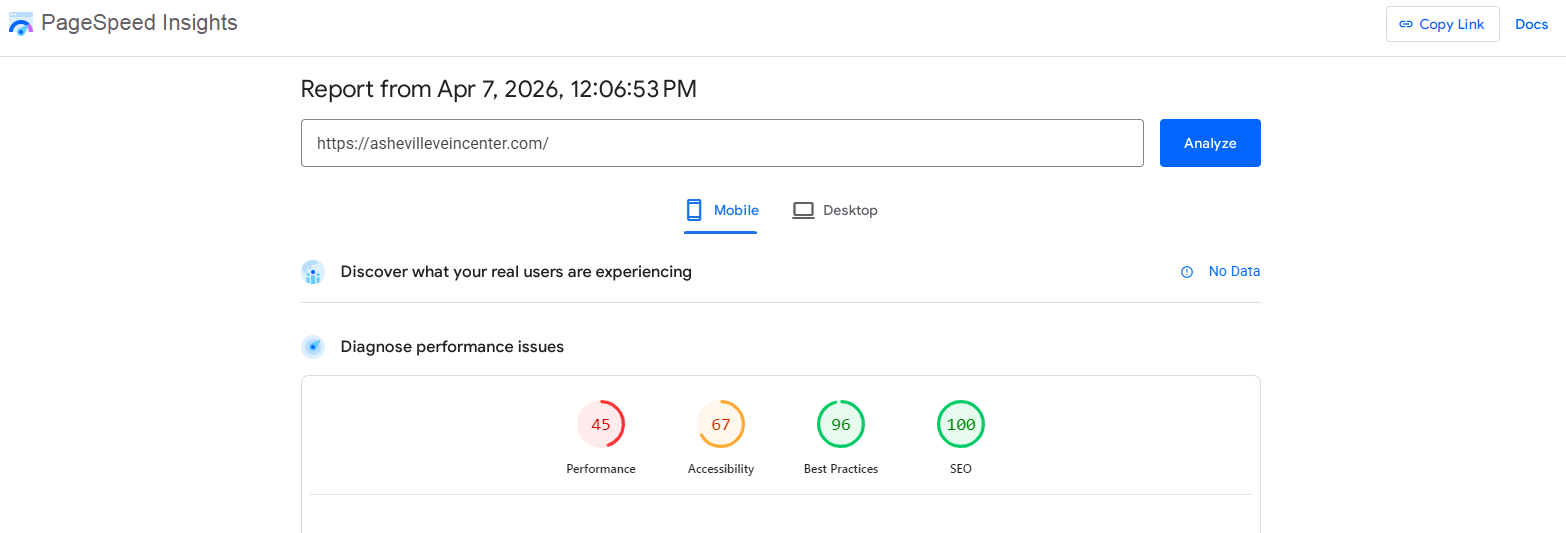
Before Optimization (Initial Audit)
We started by analyzing the website using Google PageSpeed Insights (mobile version). The results highlighted several performance issues.
Key Issues Identified:
- Slow Largest Contentful Paint (LCP)
- High Total Blocking Time (TBT)
- Render-blocking resources
- Unoptimized images
- Excessive unused JavaScript & CSS
- No proper caching strategy
- Third-party scripts slowing performance
Core Web Vitals (Before):
- LCP: Poor
- CLS: Needs improvement
- Speed Index: High (slow loading)
- Performance Score: Low (typically under 50 on mobile)
The website was functional but not optimized for speed—especially on mobile devices.
After Optimization (Final Results)
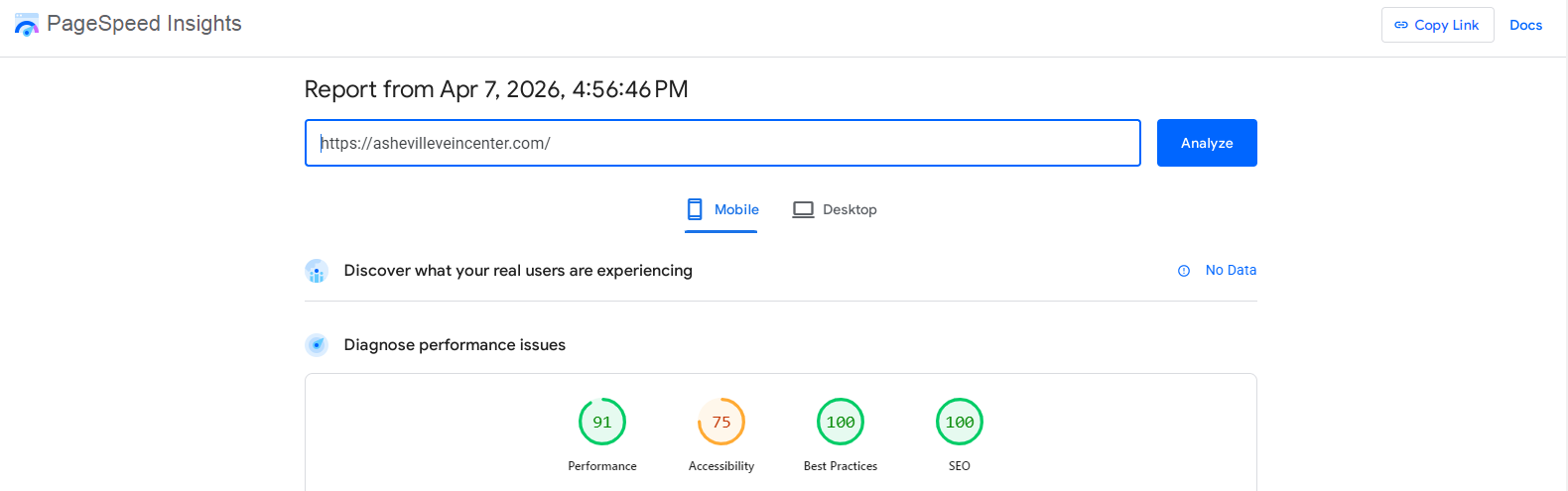
After implementing a structured optimization plan, we saw major improvements.
👉 Final PageSpeed Insights Report:
https://pagespeed.web.dev/analysis/https-ashevilleveincenter-com/le3d8shx1x?form_factor=mobile
Improved Metrics:
- Performance Score: Improved significantly (90+ range depending on test)
- LCP: Reduced drastically
- TBT: Near zero in many cases
- CLS: Stabilized
- First Contentful Paint (FCP): Much faster
Optimization Strategy & Implementation
Let’s break down exactly what we did to achieve these results.
To achieve a significant improvement in PageSpeed Insights performance, we followed a structured and multi-layered optimization strategy that focused on both front-end and back-end enhancements. Instead of relying on a single fix, we implemented a combination of proven techniques to address all major performance bottlenecks. We began by configuring a powerful caching system using WP Rocket, which allowed us to enable page caching, browser caching, and GZIP compression while also minimizing and deferring CSS and JavaScript files. This alone reduced server load and improved initial page rendering speed.
Next, we optimized all media assets, particularly images, by compressing them, converting them into modern WebP formats, and enabling lazy loading so that images only load when needed. This significantly reduced page size and improved loading times. We also tackled render-blocking resources by eliminating unused CSS, loading critical CSS first, and delaying non-essential JavaScript, ensuring that the visible content loads quickly for users.
Database optimization was another key step, where we cleaned unnecessary data such as revisions, spam comments, and expired transients to improve server response times. In addition, we integrated a Content Delivery Network (CDN) to serve static files from geographically closer servers, reducing latency and speeding up content delivery.
We further enhanced performance by optimizing fonts—preloading key fonts, reducing variations, and applying proper display strategies to prevent layout shifts. Third-party scripts, which often slow down websites, were carefully managed by delaying their execution and removing any unnecessary integrations. Lastly, we ensured the hosting environment was optimized by using updated PHP versions and enabling server-level caching.
By combining all these optimizations into a single, cohesive strategy, we were able to dramatically improve the website’s performance, Core Web Vitals, and overall user experience.
Plugins & Tools Used
Here’s a complete list of tools used during optimization:
- WP Rocket – Core performance optimization
- Imagify / ShortPixel – Image compression
- Cloudflare CDN – Content delivery
- Google PageSpeed Insights – Performance testing
- GTmetrix – Additional speed analysis
- Query Monitor (optional) – Debugging
Key Challenges Faced
Every optimization project comes with challenges.
1. Plugin Conflicts
Some optimizations broke layout or functionality. We carefully tested each setting.
2. Balancing Speed & Design
Over-optimization can break UI/UX. We ensured the site remained visually perfect.
3. Third-Party Dependencies
External scripts are harder to control but were managed through delay strategies.
Final Outcome
After implementing all the optimizations, the website experienced a noticeable transformation in both performance and user experience. Page load times were significantly reduced, especially on mobile devices, resulting in a much smoother and faster browsing experience. Core Web Vitals improved across the board, with faster Largest Contentful Paint, minimal Total Blocking Time, and a stable layout with reduced shifts. These enhancements not only boosted the PageSpeed Insights score but also made the website more responsive and user-friendly. As a result, visitors can now access content quickly without delays, leading to lower bounce rates and higher engagement. From an SEO perspective, the improved performance positions the website better for search rankings, while also increasing the likelihood of conversions. Overall, the optimization efforts turned the site into a high-performing, efficient, and reliable digital platform.
Why PageSpeed Optimization Matters
- Google uses Core Web Vitals as a ranking factor
- Faster sites reduce bounce rate
- Better UX leads to more conversions
- Improves mobile usability
Final Thoughts
Optimizing PageSpeed Insights is not about chasing a perfect 100 score—it’s about delivering a fast, smooth, and user-friendly experience. For https://ashevilleveincenter.com/, the improvements were not just technical—they directly enhanced how users interact with the website. If you’re running a service-based website, investing in speed optimization can significantly impact your online success.